How to host an STS
Approval
You can only host an STS with permission from the Highest Rank online (Excluding Directorial Board), as long as it is under these reasons:
-
Server is too hectic to the point the RP is being affected.
-
Too many mod calls.
-
An STS has not been hosted in at least 1-2 hours.
Roles
Once permission is given, collect all staff members into the Online Staff VC, and assign the following roles:
-
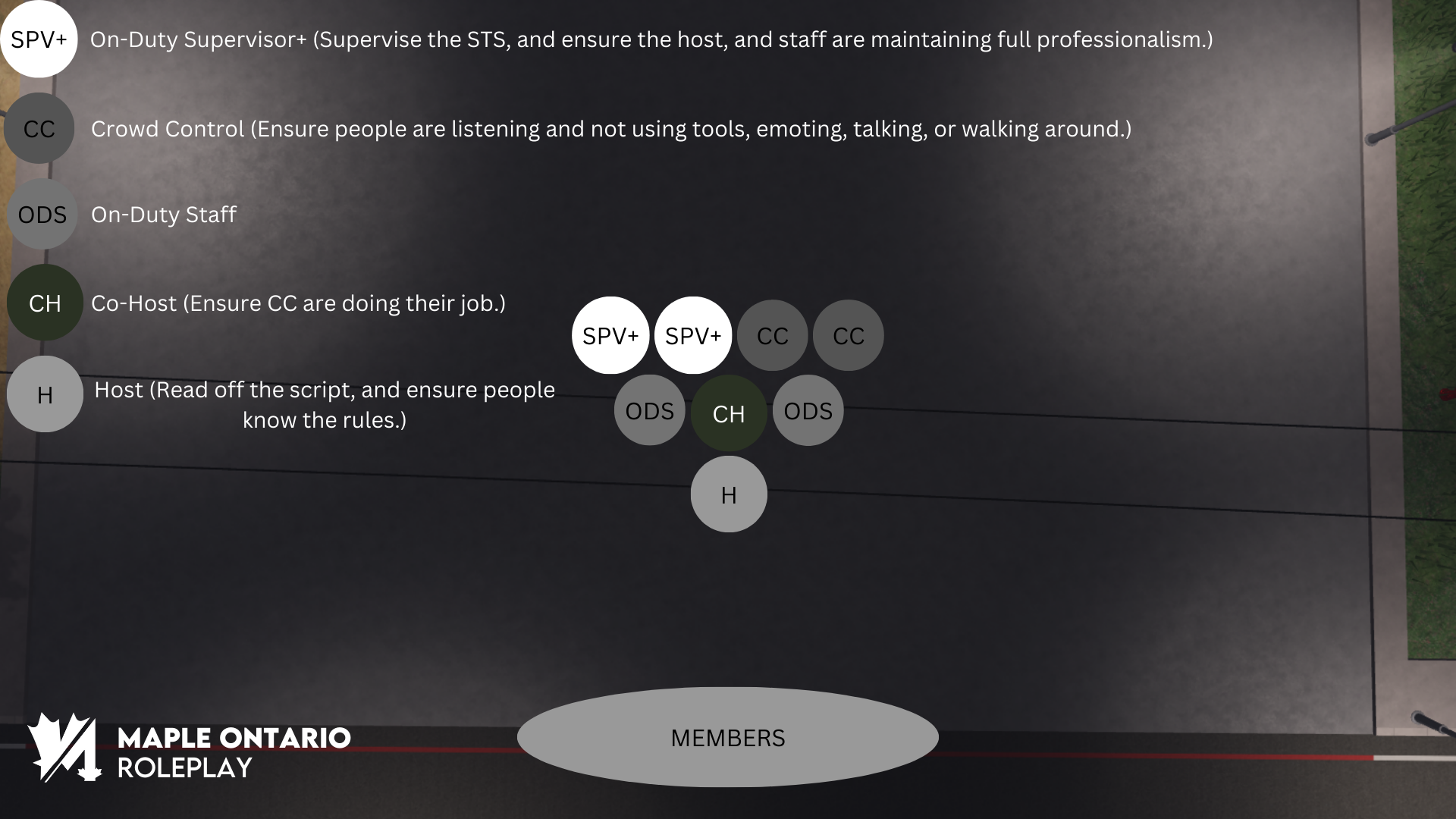
At least 1 Supervisor+ to Supervise the STS
-
At least 1 person for Crowd Control
-
At least 1 On-Duty Staff Member (optional if not applicable due to amount of staff online)
-
A Co-Host
Preparation
After this, prepare the Fire Department for the STS, and ensure it follows these regulations:
-
At least 2 Staff Cars must block the road between the Fire Department, and the City Park Entrance, on the sides.
-
At least 3 Barriers must be placed on the Forward-facing side of both staff vehicles, with equal spacing.
-
Ensure all Staff are in the correct formation.
Formation
To maintain a professional outlook, all Staff in an STS must abide by the below formation, faliure to do so will result in severe punishment.
Script
Please read these all vocally, excluding ones that start with :m.
BEFORE THE STS
:m [NOTICE] An STS (Shoulder to Shoulder) is commencing soon, please wrap up all your roleplays before being teleported.
TELEPORTING
Do :bring all at least 3-4 times, to ensure everyone is there.
Then run the following command:
:m Please stand on the red line, failure to obey will result in a kick without notice.
STARTING THE STS
Start the STS via the STS stage, then run the following command:
:m Please join the STS stage immediately.
Once at least half of the server-count are in the STS, start reading off the following script,
VOCALLY, NOT THROUGH :M OR :H MESSAGES.
Hello everyone, and welcome to Maple Ontario Roleplay.
We, the Staff Team, have decided to host this STS to ensure all people in the in-game server know our server rules and to maintain orderly roleplay.
Please do not emote, take out any tools, move, or talk during this STS, to ensure we have your full, undivided attention, or you may be subject to a kick from the server.
We will now begin with our In-Game Server Rules which you can find at anytime in our rules channel.
Here at Maple Ontario Roleplay we dedicate to a realistic atmosphere, to maintain this, we have the following Realism Based Guidelines.
If you are in a scene with a gun to your head, you must roleplay as fearing for your life, failure to do this will result in moderation for Fear Roleplay.
You must roleplay all crashes that are exceeding 30 MPH.
You must not metagame, this is where you use information gained outside of roleplay to your advantage inside of roleplay.
At Maple Ontario, RDM and VDM is strictly prohibited.
When an EMS or LEO is sounding their lights and sirens, you must then yield to them.
‘Roleplay Motions’ must be maintained at all times. Gun Motion is no longer required for handguns, but is required for heavy weapons such as the AK-47. Cuff Motions are not required.
You must not interrupt, or involve yourself in an RP Scene that does not concern you.
At Maple Ontario Roleplay, you must have a realistic avatar.
New Life Rule is required to be maintained, meaning when you die, you must start a new life from fresh, with no knowledge of your previous characters death.
Unless visible, vests are not an excuse to violate NLR. If a vest is visible, you may use that vest once to protect yourself from death unless a shot is fatal.
All members are expected to be in a Discord Roleplay VC at all times to avoid flagging from our VC Checking system.
Common Sense must be used in our community. If a rule is not listed here, but is a common rule in other communities, then you may still be moderated for it.
Our banned vehicles, and guns can be found in the In-Game Rules channel.
We will now be conducting VC Checks, if you are kicked, you were flagged by our system.
VC Checks
To conduct a VC check, go to the Melonly Dashboard, then to ‘ER:LC Toolbox’ then ER:LC Member Check. Kick anyone who is not in VC.